1. Click the "Select image" button to upload the image you want to convert (supports png, jpg, gif)

2. Select the target ICO size to generate (icon files are usually small; common sizes are 16x16, 32x32, 48x48)

3. Click the "Generate ICO icon" button, then download the generated ICO icon and save it to your website's root directory.

Select image...

Introduction to the online ico icon maker tool

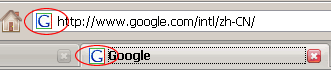
1、favicon.icoUsually used as the site logo thumbnail placed in front of a url; favicon.ico appears in the browser's address bar or tab, as shown belowIn circleplace, currently almost all browsers support ico icons.
2. Once the favicon.ico file is generated successfully, the browser automatically pops up the ico download; click Save and place the downloaded favicon.ico in the root directory (other directories also work).

3. In the page source file's<head></head>Insert between tags<link rel="shortcut icon" href=" /favicon.ico" />。

Recently used:

How to use

This tool belongs to the “Webmaster tools” category.

  1. 1Have your domain or source file ready — a favicon image, an .htaccess file, a site URL.
  2. 2Follow the prompt and read the specific items returned (status code, size, matched rule).
  3. 3Download the artefact and place it yourself, e.g. a favicon needs to sit at the site root and be declared with a link tag.

Your input is processed locally in the browser whenever possible. We do not store it.

Frequently asked questions

The check looks cached

Most checks rely on public fetching, and the target may sit behind a CDN. Re-test later or compare nodes.

Is the ICP filing lookup accurate?

It comes from a public endpoint and can lag. The MIIT record is authoritative.

Why does the favicon not show on mobile?

Ship multiple sizes (or a PNG) and declare link rel="icon"; browser caching also delays the new icon.